
A GoodLinks alternative only makes sense if your problem is one GoodLinks was never built for. GoodLinks is a read-later app for one person: you save articles, read them in a clean reader and highlight them. Shareling is for two people who send each other links and want both of them to keep each one. If that second job is yours, Shareling is the closer fit; if you mostly save articles to read yourself, GoodLinks does that better.
Facts about GoodLinks on this page come from its own site, help pages, release notes and US App Store listing, read on 2026-09-25 and collected in the research doc listed in the sources. Sending a link to a person in Shareling is designed but not built yet, so everything here about sending describes Shareling at launch.
What is GoodLinks, and what does it cost?
GoodLinks is a native read-later app for iPhone, iPad and Mac, bought once on the App Store and synced through iCloud with no account to create. Its App Store tagline is "Save links, read later." It needs iOS 16, iPadOS 16 or macOS 13 or later, runs natively on Apple Silicon Macs, and lists no Android, Windows or web app.
You save into it from share extensions on iOS and macOS, or from its browser extension for Safari, Chrome and Firefox, which also installs in Arc, Edge, Opera and Brave. The extension saves through iCloud, and GoodLinks says it "does not pass anything through our server".
The price on the US App Store was $9.99 on 2026-09-25, with in-app purchases and no free tier. The model is "buy once, use forever with one year of feature upgrades". After that year, new features need GoodLinks Premium, listed as an "Annual Feature Upgrade" at $4.99; anything you unlocked while subscribed stays unlocked, and bug fixes keep coming without it. The release notes tag Highlighting, Article Sync and AI Custom Actions as Premium features. It supports Family Sharing.
Shareling's pricing is on the plans page.
What does GoodLinks do better than Shareling?
GoodLinks does reading better, by a wide margin, because reading is what it is built around and Shareling has no way to read an article inside the app. Its reader view extracts the article text, strips web ads and can log in to paywalled sites. You can highlight in colours, add notes to highlights, browse every highlight in a Notebook and export them as Markdown. Summaries run through Apple Intelligence or an outside model with your own API key. With Article Sync, a Premium feature, each article is saved as a permanent copy in your iCloud, and images can download automatically for offline reading.
Shareling stores none of that. A Shareling link holds the address, title, site name, the page's own description, a preview image address, a favicon address and your note. There is no field for the article's text, so there is no reader view, no highlight, no summary and no offline copy of the page. AI features are out of scope for Shareling's first version.
GoodLinks also reaches further into Apple's system: Shortcuts and Siri, widgets, AppleScript, Focus Filters that show only chosen tags, a Mac menu bar mode, and a local API on the Mac that reads and changes links, tags and highlights over localhost. It imports from Instapaper, Pinboard, Raindrop, Matter, Readwise, Abyss, Anybox, Reeder, Omnivore and browser bookmarks. Shareling imports one thing, a Chrome bookmarks file on the Mac, and a browser extension is out of scope for its first version.
Finally, GoodLinks needs no account ("all you have to do is install the app"), and you pay once for every Apple device you own.
One claim to treat with care: GoodLinks' site says its search covers "title, author, description, and content", while its App Store copy lists "title, author, and description". The two pages disagree on whether the article text itself is searched, so this page does not count full-text search in either column.
Can you send a link to someone with GoodLinks?
You can hand a link to another app, but you cannot send it into another person's GoodLinks library. GoodLinks describes sharing as actions: star an article, share it to other apps, export it to PDF, or copy it as plain text or Markdown. Custom Actions can run a Shortcut or open a URL scheme. Its site describes no shared or collaborative list, no recipients and no invites.
Sync does not stretch to two people either. GoodLinks' iCloud sync needs the same iCloud account and iCloud Drive on every device, so it keeps one person's iPhone, iPad and Mac in step. A link you share out of GoodLinks lands in whatever app you picked, in a chat thread for instance. Because GoodLinks is a paid download with no free tier, each of you would also buy it.
How does Shareling send a link to one person?
At launch, you drop a link on a person in Shareling, and it then sits in both your libraries: yours under Sent, theirs under Received. On the Mac the design has you drag a link to the top of the screen, where a capsule by the notch opens with the people you share with. A drop lands in one of three places: a person (send), yourself (keep), or a new person (invite). After the drop you can write a note or add a folder.
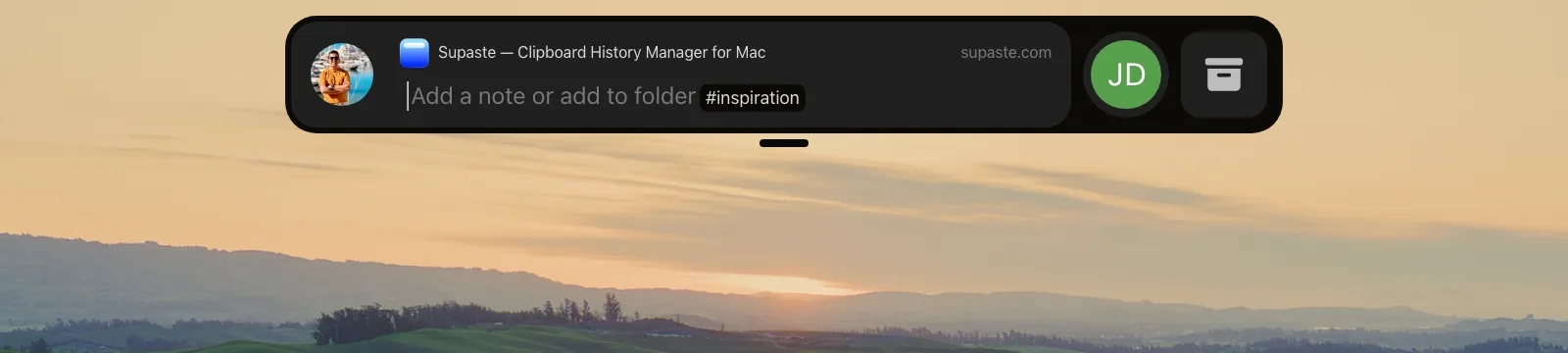
The rules behind it, from Shareling's design decisions:
- One drop, one person. There is no multi-select and no group. Sending to three friends takes three drops, and each can carry its own note.
- The link exists once. It lives in an iCloud zone you own, shared with that one person. A friendship is two such channels, one per direction.
- The note travels; your filing does not. Your folders, favorites, read-later flag and read state live in your own private zone. The sender is never told when you open a link.
- You can take it back briefly. Unsend deletes a sent link within one hour. Removing a person first copies everything they sent you into your own zone, so you keep it.
Sending, invites, the notch drop, Unsend and Remove person are all designed but not built. The live iCloud connection between two people is a later piece of work.
Where does Shareling win?
Shareling wins wherever a link is meant for someone else. The link reaches your friend inside the same app where you both keep links, with your note on it, instead of in a chat thread that scrolls away. Neither of you copies it anywhere.
It also keeps sent, received and self-kept links in one library, with All links, Recents, Sent and Received as filters over it. A link that reaches you twice shows once, because Shareling matches links by a cleaned-up form of the URL. That cleaning also strips tracking parameters such as utm_source, fbclid and gclid before a link is saved or sent.
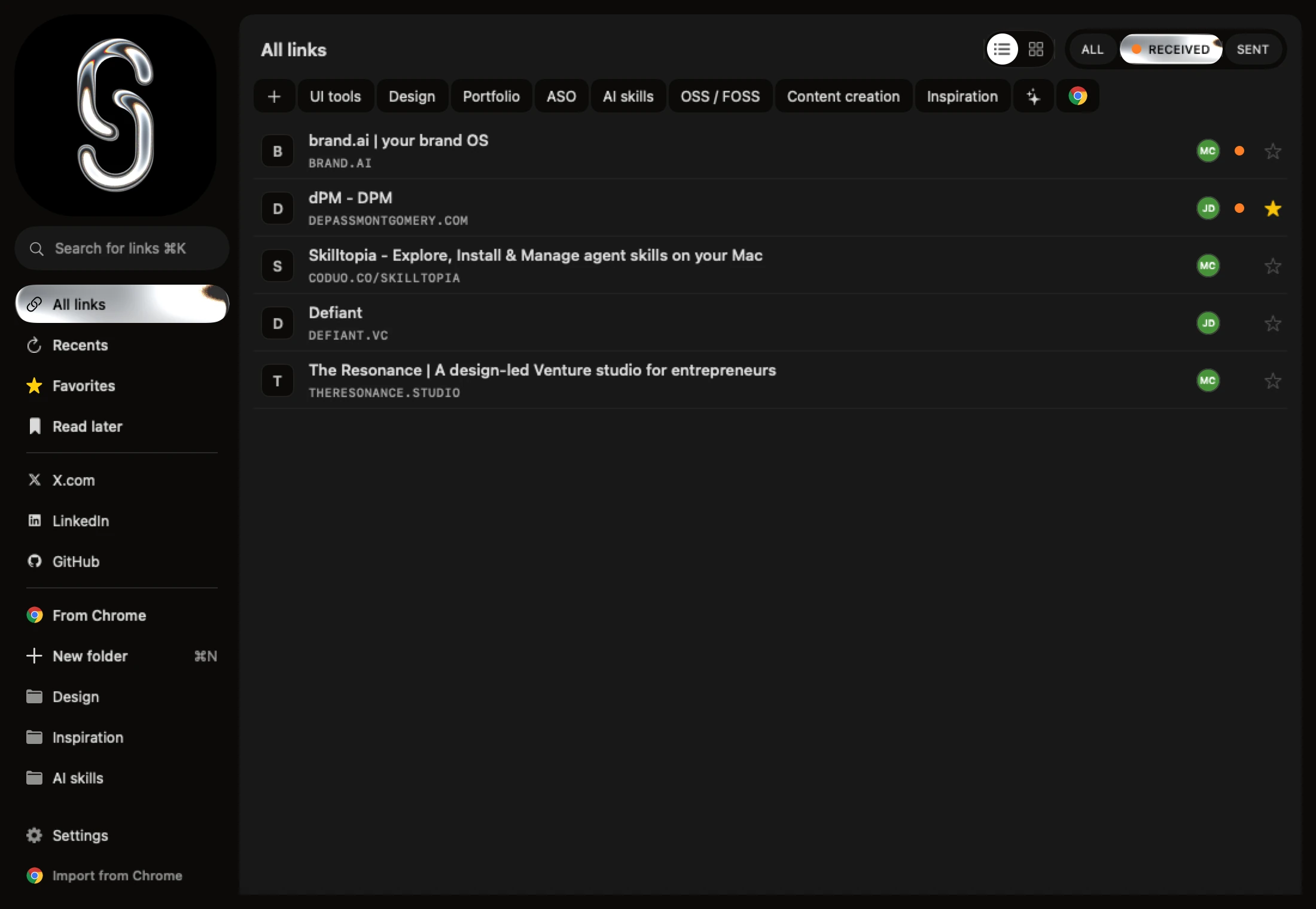
Filing is close to GoodLinks'. GoodLinks organises by tags and stars with no folders. Shareling's UI says "folder", but a folder works like a tag, so one link can sit in two; it also has Favorites and a Read later list. Shareling's search covers a link's title, address, note and page description.
GoodLinks vs Shareling: feature comparison
| GoodLinks | Shareling | |
|---|---|---|
| Main job | Read-later for one person | Send a link to one person; both keep it |
| Platforms | iPhone, iPad, Mac (iOS/iPadOS 16, macOS 13 or later) | Mac, iPhone, iPad (macOS, iOS, iPadOS 26 or later) |
| Price | $9.99 once, no free tier; Premium $4.99/year for new features | See plans |
| Send a link into another person's library | No | Yes, at launch (not built yet) |
| Shared lists | No | No: two-person channels only, no groups |
| Note that travels with a link | Not applicable: no sending | Yes, at launch |
| Reader view | Yes | No |
| Highlights and notes on text | Yes (Highlighting tagged Premium) | No |
| Permanent article copy | Yes (Premium) | No, the page is not stored |
| AI summaries | Yes | No |
| Organisation | Tags and stars | Folders that work like tags, Favorites, Read later |
| Search | Title, author, description; article content disputed between its own pages | Title, address, note, page description |
| Browser extension | Safari, Chrome, Firefox | No |
| Import | Instapaper, Pinboard, Raindrop, Matter, Readwise, Abyss, Anybox, Reeder, Omnivore, browser bookmarks | Chrome bookmarks file, on the Mac |
| Tracking parameters stripped | Not covered by the research | Yes |
| Sync | iCloud, one person's devices | Each person's iCloud at launch; no sync in the current build |
What are Shareling's limits?
Shareling is Apple-only and asks for newer systems than GoodLinks. It needs macOS, iOS or iPadOS 26 or later, while GoodLinks runs back to iOS 16 and macOS 13. The person you send to needs Shareling too, since the link lands in their Shareling library.
Its channels hold exactly two people. There is no way to send one link to a group in one step. At launch its data sits in each person's iCloud, so it will depend on iCloud the way GoodLinks does; today nothing syncs. And its core feature, sending to a person, is not built yet: today it keeps your own links, imports Chrome bookmarks and saves from the share sheet.
Should I pick GoodLinks or Shareling?
Pick GoodLinks if you save articles to read later by yourself. Its reader, highlights, offline copies and deep Apple integration are the reason to own it, and Shareling has none of those reading features.
Pick Shareling if the links that matter are the ones you and one other person trade, and you are tired of finding them again in Messages, X or LinkedIn. It is built to put each of those links in both your libraries with the note that explains it. Plenty of people could use both: GoodLinks for reading, Shareling for passing links to one friend.
Frequently asked questions
Is there a GoodLinks alternative that lets me send a link to a friend?
Shareling is designed for that. At launch you drop a link on one person, with a note if you want, and it sits in both your libraries under Sent and Received. GoodLinks can share a link out to other apps, but the research found no shared list and no way to put a link into another GoodLinks user's library. Sending in Shareling is not built yet.
Does Shareling have a reader view or highlights like GoodLinks?
No. Shareling keeps the link, its title, site, page description and your note, and opens the page itself. It stores no article text, so it has no reader view, no highlights and no offline copy of the page. GoodLinks has all three, with permanent article copies as a Premium feature.
How much does GoodLinks cost?
On the US App Store on 2026-09-25, GoodLinks cost $9.99 with no free tier, as one purchase for iPhone, iPad and Mac. New features after the first year need the GoodLinks Premium upgrade, listed at $4.99 a year; features you unlocked stay yours. Shareling's pricing is on its plans page.
Can two people share one GoodLinks library?
Not according to GoodLinks' own pages as read on 2026-09-25. Its iCloud sync needs the same iCloud account on every device, so it keeps one person's devices in step. There are no shared lists or invites.
Does Shareling work on Android or Windows?
No. Shareling runs on Mac, iPhone and iPad with macOS, iOS or iPadOS 26 or later. GoodLinks is Apple-only too, on iOS 16, iPadOS 16 and macOS 13 or later.
Send a link to the person you mean it forShareling is a Mac, iPhone and iPad app for sending a link to one person and keeping the links you save, synced through your own iCloud.