
Anybox is a native bookmark manager for Mac, iPhone and iPad, built for one person keeping their own links. Shareling is for two people who send each other links: you send a link to one person, and it lands in both your libraries. If you want the best solo bookmark app on a Mac, Anybox is the stronger choice. If the links you care about come from one other person, that is the job Shareling is designed for.
Facts about Anybox below come from its own site, FAQ and App Store listing, read on 2026-09-25 and collected in Shareling's research notes. Facts about Shareling come from its code and design decisions. Sending to a person is designed but not built yet, so those parts describe Shareling at launch.
What is Anybox and what does it cost?
Anybox is a bookmark app for Mac, iPhone and iPad, written in Swift with AppKit and UIKit, that syncs through your own iCloud. Its FAQ says there are no plans for Windows or the web. It saves notes, images and files as well as links, and it has browser extensions for Chrome, Edge, Firefox and Safari.
Pricing, in US dollars, as listed on anybox.app:
| Plan | Price | What you get |
|---|---|---|
| Free | $0 | Most features, 50 links in total, 12 links on Anydock, export |
| Pro monthly | $1.99 | Unlimited links, 30 links on Anydock |
| Pro yearly | $14.99 | The same |
| Pro lifetime | $39.99 | The same, paid once |
The site shows the lifetime price as "$39.99 ($59.99)", and the US App Store lists two lifetime options, at $39.99 and $59.99. One purchase covers every platform, and Anybox notes that App Store prices may vary. Its FAQ says it offers no discounts at the moment.
What does Anybox do better than Shareling?
Anybox does far more for one person managing a large library on a Mac. It has both folders and nested tags, where tags can carry icons, colours and their own archive setting, plus Smart Lists that filter by kind, tag or date added. Quick Find is a Spotlight-style search you can open from anywhere, Quick Save and Save Current Tab capture pages, Anydock is a floating bookmarks bar, and Quick Links open a saved link from a keyword. It also has a menu bar version, widgets, an iPhone keyboard extension, AppleScript, URL schemes and an MCP server on the Mac that listens only on your own computer.
It keeps copies of pages, too. Anybox can archive a bookmark as a PDF, a web archive or a screenshot, automatically for chosen tags, and it has a Reader view. Shareling stores no copy of the page.
Anybox also brings more in and lets more out. Its Migration Assistant imports from browsers, its App Store listing says it also imports from other third-party apps, and it exports bookmarks as JSON or HTML, even on the free tier. Shareling imports only Chrome bookmarks and has no export command.
Finally, it is available today, with a lifetime option for people who dislike subscriptions. Its privacy stance matches Shareling's: data sits in Apple's CloudKit, and the privacy policy says Anybox cannot access it and runs no servers to store it.
Can two people share links in Anybox?
No. Anybox is single-user: its site, FAQ and App Store listing describe no shared collections, no recipients and no invites. "Share" in Anybox means handing a link to another app, so a link you pass to a friend leaves Anybox and lands wherever that app puts it.
Two people could each run Anybox, but nothing connects the two libraries. Its sync keeps one person's devices in step and needs the same account on every device. On the free tier, each library also stops at 50 links in total.
How does Shareling handle a link sent to one person?
At launch, you drop a link on one person and it appears in both your libraries: under Sent in yours and Received in theirs. On the Mac you drag the link to the top of the screen; on iPhone and iPad you use the share sheet. A drop can also land on Self, which keeps the link for you alone. That part works today from the share sheet, which saves even offline or with the app closed.
A few rules shape how this works:
- One drop, one person. No groups and no multi-select. Sending to three people takes three drops, each with its own note if you like.
- The note travels. Whatever you write when you send is the part your friend reads.
- Your filing stays yours. Folders, favorites, read later and read state are private to each person.
- No read receipts. The sender is never told when a link is opened.
- Each link exists once, in the sender's own iCloud zone. A friendship is two channels, one per direction, and there is no Shareling server holding your links.
Sent links can be unsent within one hour. Removing a person copies everything they sent you into your own zone before either share ends, so you lose nothing.
How do Anybox folders and tags compare with Shareling folders?
Anybox gives you both: folders, and tags that nest into a hierarchy. Its docs don't say whether a link can sit in more than one folder. Its MCP tools take a single folder for an item and a list of tags, which suggests one folder per link, but that is a reading of the tool reference, not a stated rule. Either way, Anybox's tags let one link carry several labels.
Shareling has one kind of label, called a folder in the app, and it behaves like a tag (tags vs folders explains the difference). A link carries a set of them, so a UI library can sit under two projects at once. A leading # is stripped, case is kept as you typed it but matched without regard to case, spaces are allowed, and names run up to 64 characters. There is no nesting.
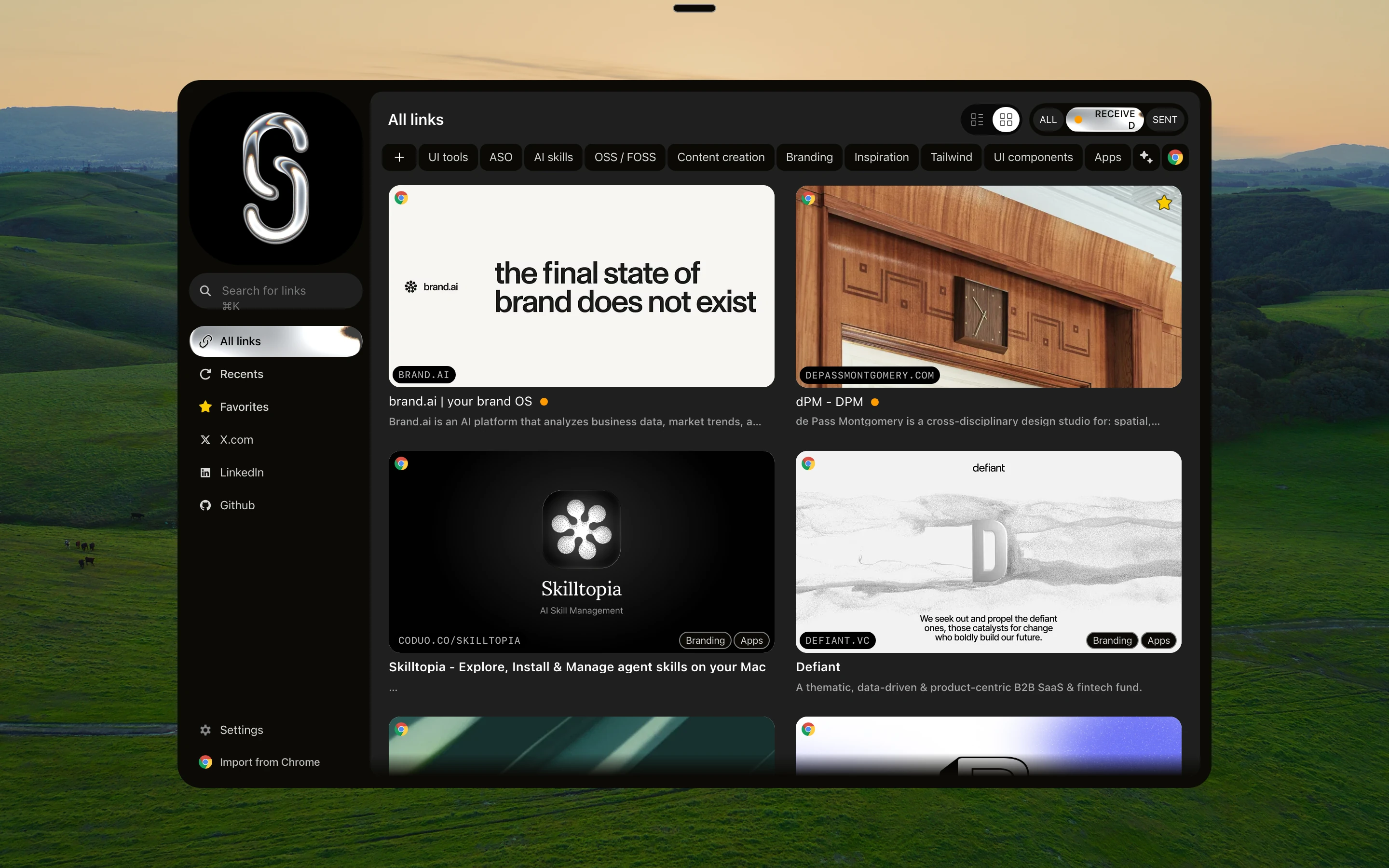
When you send a link, your folders stay with you. Your friend files it under their own folders, and neither sees the other's. When you import Chrome bookmarks, every folder a bookmark sits in becomes one of its Shareling folders (folder names over 64 characters are skipped).
Anybox vs Shareling: how do the features compare?
| Anybox | Shareling | |
|---|---|---|
| Platforms | Mac, iPhone, iPad | Mac, iPhone, iPad (macOS, iOS, iPadOS 26 or later) |
| Send a link to another person | No | Yes, to one person at a time (at launch) |
| Both people keep the link | No | Yes (at launch) |
| Labels | Folders and nested tags, Smart Lists | Folders that work like tags, private to you |
| One link under several labels | Yes, through tags | Yes |
| Note on a link | Comments, which search covers | A note that travels to the recipient |
| Page archive | PDF, web archive, screenshot | None |
| Search | Offline, over titles, URLs, descriptions, comments, keywords | Title, URL, note, page description |
| Browser extensions | Chrome, Edge, Firefox, Safari | None in v1 |
| Import | Browsers and other apps | Chrome bookmarks |
| Export | JSON, HTML, Shortcuts | None |
| Sync | Your iCloud (CloudKit) | Your iCloud (CloudKit), live sync not built yet |
| Price | Free up to 50 links; Pro $1.99/month, $14.99/year, lifetime from $39.99 | See plans |
What are Shareling's limits?
Shareling is Apple-only and needs macOS, iOS or iPadOS 26 or later, so a device that can't update to version 26 can't run it. Its main feature is not built yet: sending to a person, the notch drop, invites, Unsend and Remove person are designed, and the live iCloud connection that carries links between two people is a later piece of work.
Every channel is between exactly two people. There is no group, so a team of five can't share one collection. Version 1 has no browser extensions and no global hotkey, and it imports only from Chrome. It stores no copy of a page, so if a page disappears, Shareling has nothing to show you. At launch, your data lives in iCloud, so both people need an iCloud account.
Should I pick Anybox or Shareling?
Pick Anybox if you keep links for yourself and want a fast, deep Mac tool: nested tags, Smart Lists, page archives, browser extensions and export, with a lifetime licence and a free tier to try it under 50 links.
Pick Shareling if most of your good links come from one person, a partner, a friend or a co-founder, and you're tired of digging them out of Messages, X and LinkedIn. It is built so a link sent to one person stays in both libraries with the note attached, while each of you files it your own way. Because sending ships at launch, today it is a library for your own links, with Chrome import and a share sheet.
Plans and pricing are on the plans page.
Frequently asked questions
Is there a free Anybox alternative?
Anybox itself has a free tier, capped at 50 links in total, with export included. Shareling's plans and prices are on its plans page; this comparison does not quote them.
Can two people share a folder in Anybox?
No. As of 2026-09-25, Anybox's site, FAQ and App Store listing describe no shared or collaborative collections and no way to send a link to another Anybox user. Its Share action hands a link to another app.
Can a link be in two folders in Shareling?
Yes. A Shareling folder works like a tag, so one link can sit in several folders at once, such as a UI library filed under two projects. Folders are private: the person you send a link to never sees how you filed it.
Does Shareling archive pages like Anybox?
No. A Shareling link stores the URL, title, site name, a short page description, image and icon addresses, and your note. It keeps no PDF, web archive or screenshot of the page, and preview images are fetched again on each device.
Can I send a link to someone with Shareling today?
Not yet. Sending to a person, the notch drop, invites, Unsend and Remove person are designed but not built, and the live iCloud connection between two people is planned for a later release. Shareling today is a library for your own links.
Send a link to the person you mean it forShareling is a Mac, iPhone and iPad app for sending a link to one person and keeping the links you save, synced through your own iCloud.