
Dropover and Shareling both wake up when you drag something to the notch at the top of a MacBook screen, and that is most of what they share. Dropover catches files, links and text on a shelf you use yourself. Shareling catches a link and sends it to one person, and both of you keep it.
If you came here looking for a Dropover alternative for files, Shareling isn't one. If you came because you use Dropover to pass links to someone and they keep getting lost, read on. Shareling's notch drop is designed and prototyped but not built; everything below about it describes Shareling at launch.
What is Dropover, and what does it cost?
Dropover is a Mac drag-and-drop shelf: while you drag, you shake the pointer, press a shortcut or drop onto the menu bar icon or the MacBook notch, and a small floating window called a shelf appears to hold what you dragged. It takes folders, documents, images, links, text snippets and web images, and version 5.3.0 added messages dragged out of Mail. It needs macOS 13 or later, the current version is 5.3.1, and it is sold only through the Mac App Store.
The price, read from Dropover's App Store listing and FAQ on 25 September 2026:
- Free to download, with a fully working 14-day trial.
- After the trial it keeps working, with a 3-second wait before you can use a shelf.
- Dropover Pro is a $7.99 in-app purchase, one time, not a subscription. It carries across Macs signed in to the same iCloud account, and it supports Family Sharing.
- Business seats are not available yet.
The notch is one of Dropover's doors, not where it lives. Dropover's own page says "Drop files onto the notch to create a new shelf", and a Mac without a notch opens shelves just as well by shake, shortcut or menu bar.
Do Dropover and Shareling do the same job?
No. They catch the same gesture and then do different things with it.
A Dropover shelf is a holding area for you. It keeps a reference to your files rather than copying them, so you can gather things from several windows and drag them out again somewhere else. Shelves are temporary: you can reopen up to 10 closed ones, and a pinned shelf stays until you remove it or its files become inaccessible. When you want someone else to have an item, Dropover passes it on through the macOS Share menu (Mail, Messages, AirDrop) or uploads it and gives you a public link.
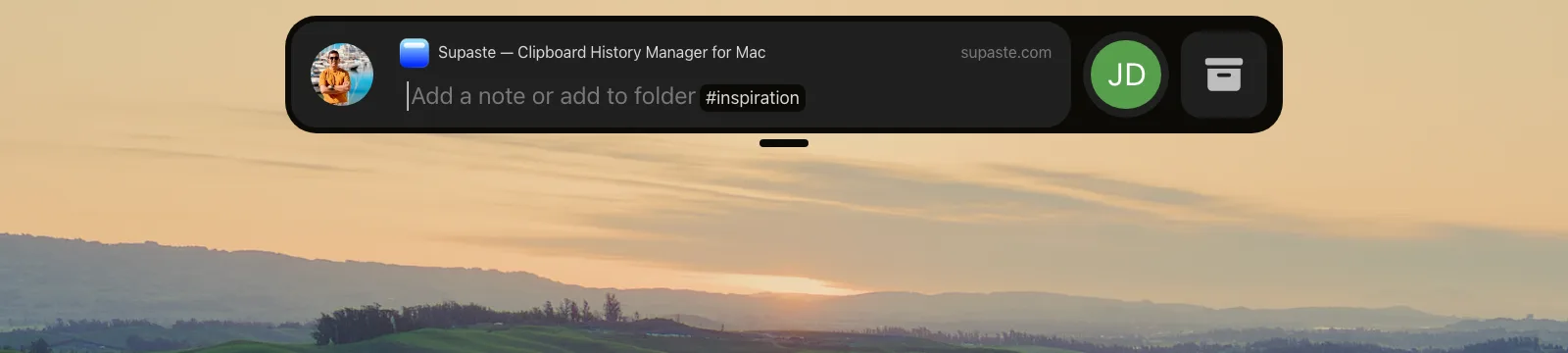
Shareling's notch surface is a capsule at the top center of the screen. Before a drag it draws nothing. When you drag a link, it opens under the cursor and shows the people you share links with as bubbles, plus Self and New person. Drop the link on a person and it is sent to them. Drop it on Self and you keep it. Drop it on New person and you start an invite.
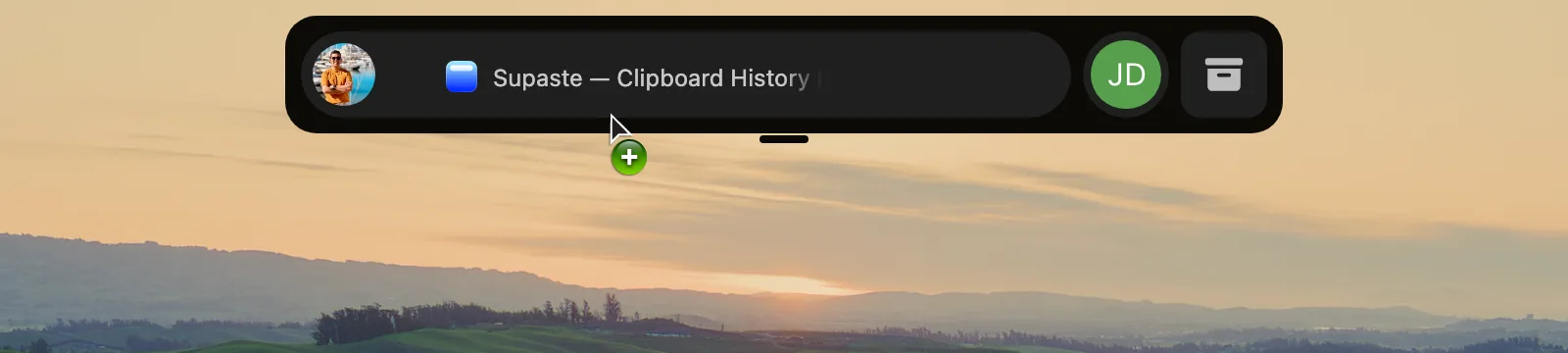
What happens next is the part Dropover has no equivalent for. A sent link lives once, in the sender's iCloud zone, which is shared with that one recipient. It shows in your library under Sent and in theirs under Received, with no second step to save it. A note you type at the drop goes with it.
What does Dropover do better than Shareling?
Dropover does far more at the drop, and all of it is available today. The specifics:
- It takes anything you can drag. Files, folders, images, links, text and Mail messages go on one shelf. Shareling's notch only ever receives links.
- It works on what you drop. Built-in actions resize and convert images, extract text and make ZIP archives, and Instant Actions run the moment something lands. Custom scripts (AppleScript, Automator, UNIX), Siri Shortcuts, watched folders, screenshot shelves, and Alfred and Raycast extensions go further. Shareling has none of this.
- It gives anyone a link. One click uploads a shelf item and copies a public link, through Dropover Cloud or iCloud Drive, Dropbox, Google Drive, OneDrive, S3 or Imgur. Dropover Cloud needs no account on either side, can add a title, password and expiry, and can email the link to an address. The person on the other end needs no app at all. A Shareling recipient needs Shareling.
- It opens from more places. Shaking the pointer, a keyboard shortcut, the menu bar icon and the notch all open a shelf, and Dropover can also be reached from Spotlight, desktop widgets and Control Center.
- It is shipping, cheap and has a usable free tier. Shareling's notch drop is not built yet, and Shareling's pricing is on the plans page.
If your drags are mostly files, screenshots and images, Dropover is the better tool, and Shareling doesn't try to compete with it.
Where does Shareling do better?
Shareling does better at one job: sending a link to one specific person so that both of you still have it next month.
Dropover can get a link to someone, but each route ends where Shareling starts:
- Through Messages or Mail, the link lands in a chat thread or an inbox, the scattered places Shareling was built to pull links out of.
- Through Dropover Cloud, a file becomes a public link. Dropover's terms say the email option "does not restrict access to that recipient", so anyone the link is forwarded to can open it. The upload is deleted after three days by default, which you can change in settings, and nothing is kept for either side after that.
- Through iCloud Drive, Dropbox or another cloud service, the file gets a public link that lasts as long as that service keeps it; the recipient still gets a web page, not a saved item.
In Shareling the link stays until someone removes it, and in the design every way of removing it is spelled out:
- Unsend: you can delete a link you sent within one hour. It leaves no marker.
- Hide: either person can hide a link from their own view at any time. Nothing is deleted.
- Remove person: ending the connection copies every link they sent you into your own zone before either share is revoked, so you lose nothing.
The rest is about privacy between the two of you. Your folders, favorites and read state are private to you and never travel with the link. The sender is never told when you open it: Shareling has no read receipts. Only the note travels. And because Shareling runs on iPhone and iPad as well as Mac, a link dropped on the notch reaches someone reading on their phone as a saved item in the app, where a Dropover recipient on an iPhone gets a web page or a message.
How do Dropover and Shareling compare feature by feature?
Dropover facts come from its App Store listing and website, read on 25 September 2026. Shareling facts describe the notch drop as designed for launch.
| Dropover | Shareling (at launch) | |
|---|---|---|
| What a notch drop does | Creates a new shelf | Sends to a person, keeps for yourself, or invites someone |
| What you can drop | Files, folders, images, links, text, Mail messages | Links only |
| Other ways in | Shake, shortcut, menu bar icon; also Spotlight, widgets, Control Center | None on Mac; iPhone and iPad send from the share sheet |
| Actions on the dropped item | Resize, convert, extract text, ZIP, scripts, Shortcuts | A note, and your own private folders |
| Sending to a person | Share menu, AirDrop, or a public link emailed to an address | Drop on their bubble; it lands in their library |
| Who receives it | Dropover Cloud: anyone who has the link | The one person you sent it to |
| How long it lasts | Dropover Cloud: 3 days by default, changeable. Shelves: temporary, pinned ones kept | Kept by both sides; the sender can unsend within 1 hour |
| Where the recipient finds it | A web page, or the app it was shared through | Received, in their Shareling library |
| A note to the recipient | A title on a Dropover Cloud upload; no notes on any page read | A note typed at the drop travels with the link |
| Platforms | Mac only, macOS 13 or later | Mac, iPhone and iPad, version 26 or later; notch drop on Mac |
| Available today | Yes, version 5.3.1 | No, the notch drop is designed and prototyped |
| Price | Free with a 3-second wait; Pro $7.99 once | See plans |
What are Shareling's limits here?
Several of Shareling's limits sit exactly where Dropover is strong.
- Not built yet. Sending to a person, invites, the notch drop, Unsend and Remove person are designed and not built. The live iCloud connection that carries a link between two people is planned for later work.
- Links only. The notch surface only ever receives URLs. A PDF or a screenshot needs another tool.
- Two people per channel. There are no groups: one drop goes to one person, so sending a link to three friends takes three drops.
- Both people need Shareling and iCloud. Links live in iCloud zones owned by the people who use Shareling, and a new contact starts with an invite.
- Apple devices only, on macOS, iOS and iPadOS 26 or later.
- The prototype has limits. It ran on a Mac display with no notch. A notched MacBook, an external display and a second desktop Space have not been tested.
Should I use Dropover, Shareling, or both?
Pick by what you drag and who it is for.
- Pick Dropover if you drag files, images and screenshots, want to process them on the way, or need to hand a file to anyone through a link without asking them to install anything. It works today, on any Mac from macOS 13.
- Pick Shareling if what you pass around is links, to one or two particular people, and you want both of you to find them again later instead of scrolling back through Messages.
- Use both if you do both jobs. Someone who moves files between windows all day and also sends articles to a partner or a close colleague has two separate needs, and neither app covers the other's. Both respond to a drag at the notch, and Shareling has not been tested alongside Dropover. Dropover opens a shelf by shaking the pointer, by shortcut or from its menu bar icon, so it does not depend on the notch.
If you arrived comparing NotchNook with Dropover, this page doesn't cover NotchNook: its site and its Setapp listing could not be reached when Shareling's research was done. For how the notch drop itself works, see the notch drop page.
Frequently asked questions
Is Shareling a Dropover alternative?
Only for one of Dropover's jobs. Shareling's notch drop sends a link to one person, or keeps it for yourself, and both of you keep it in your libraries. It takes links only, so it cannot hold files, run image actions or upload anything to a public link the way Dropover does. The notch drop is designed for Shareling's launch and is not built yet.
How long does a Dropover Cloud link last?
Dropover says uploads to Dropover Cloud are automatically deleted after three days by default, and the period can be changed in settings. Free users get 1 GB of storage and Dropover Pro users get 10 GB, according to Dropover's Dropover Cloud page, read on 25 September 2026.
When Dropover emails a link to someone, can only that person open it?
No. Dropover's Dropover Cloud terms say that entering a recipient email address sends a notification containing the sharing link, but it does not restrict access to that recipient or verify who they are. Anyone the link reaches can open it.
Can I use Dropover and Shareling on the same Mac?
They are built for different jobs, so using both makes sense: Dropover for files, Shareling for links you send to a person. Both respond to a drag at the notch, and Shareling has not been tested alongside Dropover. Dropover can also open a shelf by shaking the pointer, with a keyboard shortcut or from its menu bar icon.
Does Dropover or Shareling work on iPhone?
Dropover is Mac only; its App Store listing says Only for Mac. Shareling runs on Mac, iPhone and iPad (version 26 or later), but its notch drop is Mac only; on iPhone and iPad it sends links through the system share sheet.
Send a link to the person you mean it forShareling is a Mac, iPhone and iPad app for sending a link to one person and keeping the links you save, synced through your own iCloud.