
To find links in iMessage, open the conversation's details and tap Links: on iPhone, tap the contact or group icon at the top of the conversation, swipe left, then tap Links. To look across every conversation at once, start a Messages search with the word Link and tap the filter that appears.
That covers a link you know was sent recently, in a thread you can name. The harder case is the link a friend sent weeks ago, when you remember the article but not the conversation, or when the thread itself has gone. The answers below come from Apple's own documentation (read 2026-09-24, in the iOS 26 and current iOS 27 editions); the last section describes how we built Shareling around the same problem.
How do I find a link someone sent me in Messages?
Open the conversation's details and go to the Links category. On iPhone:
- Open the conversation in Messages.
- Tap the contact or group icon at the top.
- Swipe left.
- Tap Links. Photos, Documents, Locations and Wallet sit beside it.
If Links does not appear, nothing of that type was received in that conversation. Apple's iOS 27 edition of the page lists the same steps. iOS 26 redesigned the details view so that what was shared in a conversation shows in separate sections for contact info, photos, links, location and more.
On a Mac:
- Select the conversation in Messages.
- Click the contact or group icon at the top.
- Click Links.
The Links list belongs to one conversation. If a friend sent you a recipe in your one-to-one thread and a video in a group chat, you look in two places.
Can I search Messages for links only?
Yes, on iPhone: begin a Messages search with the word Link and tap the filter that appears. Apple's steps for iOS 26:
- In iOS 26 the search field sits below the conversation list; tap it. (In iOS 18 or earlier you swipe down to reveal it at the top.)
- Type Link, then tap the filter that appears.
- To narrow it to one person or thread, type their name and tap "Messages with" or "Messages in".
- Add a keyword from the message if you remember one.
Filters combine, so "links from Sam that mention the restaurant" is one search. The search field also suggests conversations, photos, locations and links as you type. In iOS 26, Apple Intelligence can be turned on for natural-language search of messages and media.
Two limits. A conversation you recently deleted does not show up in search results. And Apple's Mac search page was outside what we checked for this guide, so the steps above are the iPhone ones.
Why did an old link disappear?
Check the Keep Messages setting first: it deletes whole conversations, attachments included, once they pass an age limit. On iPhone it lives at Settings > Apps > Messages > Keep Messages, below Message History. On a Mac it is the "Keep messages" pop-up in Messages > Settings > General. The options are 30 days, 1 year and Forever. Anything other than Forever removes conversations automatically when the time is up.
Other things that make a link vanish:
- You deleted the conversation. Deleted messages and attachments stay in Recently Deleted for up to 30 days and can be recovered from there. On a Mac, after 30 days they are removed from all your devices, and after 40 days they are permanently deleted from iCloud.
- You deleted it on another device. With Messages in iCloud on, deleting a message or conversation on one device deletes it on every device where Messages in iCloud is on.
- Your copy differs from your friend's. Deleting only affects your own devices. If your Keep Messages is set to 30 days and theirs is Forever, the link still exists in their thread and you can ask them to resend it.
Can I organise links in Messages?
Only by pinning. Apple's Messages pages describe three ways back to a shared link, the per-conversation Links category, search filters and pins, and none of them describes tags, folders, labels or notes for links.
To pin a link on iPhone, touch and hold the message bubble that contains it, then tap Pin. On a Mac, Control-click the shared content and choose Pin; this works on content you shared as well as content shared with you. Pinned content then appears in three places:
- a Pins section in the conversation details (tap the name at the top of the thread),
- a Pins section in Messages search,
- the Shared with You section of supported apps.
A pin raises a link; it does not move it anywhere. Repeat the same steps to unpin. If you want a link filed under a project, the Messages side ends here, and the link stays inside the thread it was sent in.
How do I stop losing links friends send me?
Inside Messages, set Keep Messages to Forever and pin the links you mean to come back to. Forever stops the automatic deletion, and pins give each thread a short list of what mattered.
The deeper problem is that a chat thread holds links as a side effect. The line on our landing page reads: "We're a duo and we built Shareling to easily discover everything we send each other." The links we sent each other arrived scattered across Messages, X, LinkedIn and Facebook, and a pile of them sat in Chrome bookmarks.
Shareling is designed to send a link to one specific person and keep it in a library you both read from. Sending to a person, the notch drop, Unsend and Remove person are designed but not built yet; at launch, on iPhone and iPad you share from any app to Shareling and pick the person, and on a Mac you drag the link to the top of the screen and drop it on them. Here is how the receiving side is built, from the code:
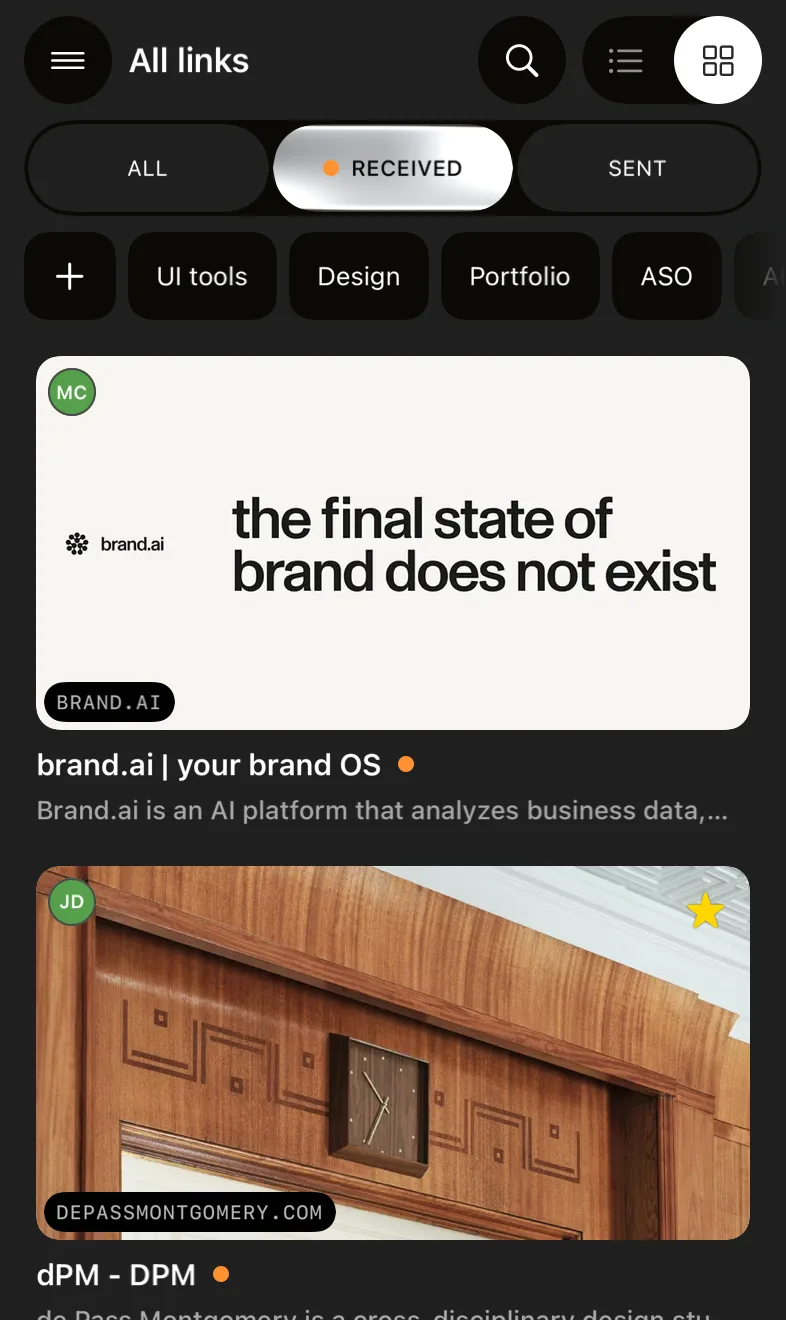
- Received is one filter, across every person. A link counts as received when it lives in a zone someone else owns. The library shows All, Received, Sent, Recents, Favorites and Read later as filters over the same set, so "what did people send me" is a tap, not a search through threads.
- Search reads more than the URL. The library's full-text index covers each link's title, URL, note and page description, so the article you half remember can be found by a word from its headline.
- One page, one entry. If the same page reaches you from two people, the library collapses the copies by the page's canonical key and shows the newest one.
- Folders are yours; the note travels. You can file a link under a folder (a link can sit under two), and nobody else ever sees your folders. The note the sender writes goes with the link.
- No read receipts. Whether you have opened a link lives in your own private zone. Favorite and Read later are private flags too.
The trade-offs, stated plainly:
- There are no groups. A channel is between exactly two people. A link sent to three friends is three sends, one each.
- A sender can unsend for one hour. At launch, within an hour of dropping a link, the sender can delete it and it leaves your library. After the hour the app refuses. The hour is enforced by Shareling's interface: the link lives in the sender's iCloud zone, and an owner can always delete their own records.
- Removing a person keeps their links. At launch, Shareling copies everything they sent you into your own library before it disconnects the two of you.
- It does not read Messages. Shareling holds links shared through its share extension or imported from Chrome, and at launch links dropped on the Mac. Links already in your Messages threads stay in Messages, so the steps above are still how you find those.
Shareling runs on Mac, iPhone and iPad. Plans and pricing are on the plans page, and the other Shareling guides cover sending and keeping links from other apps.
Frequently asked questions
Where are the links in an iMessage conversation?
In the conversation details. On iPhone, open the conversation, tap the contact or group icon at the top, swipe left and tap Links. On Mac, select the conversation, click the contact or group icon at the top and click Links. If there is no Links category, nobody sent a link in that conversation.
Can I search iMessage for links only?
Yes, on iPhone. Start a Messages search with the word Link and tap the filter that appears. You can combine it with a person by typing their name and tapping "Messages with", and with a keyword.
Why can't I find an old link in Messages?
Check the Keep Messages setting first. If it is set to 30 days or 1 year, Messages deletes whole conversations, attachments included, once they pass that age. A conversation you deleted also drops out of search, though it stays in Recently Deleted for up to 30 days.
Can I put iMessage links into folders or tags?
No. Apple documents two ways to single out a link in Messages: the per-conversation Links category and pinning. Pinning raises the link in Messages search, the conversation details and Shared with You; it does not file it anywhere.
Does Shareling read my Messages history?
No. Shareling only holds links shared through its share extension or imported from Chrome, and at launch links dropped on the Mac notch. Links already sitting in your Messages threads stay there.
Send a link to the person you mean it forShareling is a Mac, iPhone and iPad app for sending a link to one person and keeping the links you save, synced through your own iCloud.