If your iPhone camera remote is not working in Futari, the app tells you why in one of a few fixed messages, and each one points to a single cause. The messages fall into four groups: the two phones can't find each other, neither phone has a subscription, the link dropped, or the Shoot phone can't capture or save.
Futari pairs two iPhones. The Shoot phone films, and the See phone shows its live view and fires the shutter. Every message below is copied from the app's source, not paraphrased, so you can match what's on your screen. Where a message includes the other phone's name, it's shown here as [phone name].
Which Futari message means what?
Find the words on your screen in the left column; the fix is in the right column.
| Message on screen | Where | Cause | Fix |
|---|---|---|---|
| "Searching..." or "Waiting for device" | Home | No phone running Futari found yet | Open Futari on the other phone, same Wi-Fi |
| "Futari can't find your Duo" | Home | Local Network access denied | Open Settings, allow Local Network |
| "Couldn't connect" / "[phone name] declined, or took too long to answer" | Home | First connection refused or not answered | Try again, or Choose another device |
| "Subscribe to connect to anyone" | Home | Neither phone has a subscription | Subscribe on either phone |
| "Waiting…" | Viewfinder, role screen | No word from the other phone for 5 seconds | Keep both phones nearby with the app open |
| "Disconnected" | Home | The pair ended after 15 seconds of silence, or the other phone left the app | Open Futari on both phones; a remembered pair reconnects |
| "Finish setting up" / "Camera access is still off, so this phone can't shoot" | Home | Camera not allowed | Review permissions |
| "Futari still needs the camera" | Shoot | iOS has never been asked for the camera | Allow camera |
| "Camera access is off" | Shoot | Camera access denied | Open Settings |
| "Storage is almost full — new recordings will not start" | Viewfinder | 512 MB or less free | Free up space |
| "iPhone is getting warm — capture quality may drop" | Viewfinder | Phone is hot | Move it out of heat |
| "iPhone is too hot — capture may stop" | Viewfinder | Phone is critically hot | Let it cool |
| "Photos aren't being saved — allow Photos access" | Viewfinder | Photos access off | Tap Settings, allow Photos |
The capture messages from the Shoot phone's camera are in their own section below, because they're long.
Why won't my two iPhones find each other?
Two iPhones find each other in Futari when both have the app open, both are on the same Wi-Fi network, and both allow Local Network access. Until then, Home reads "Searching..." on a phone that has never paired, or "Waiting for device" on one that has.
The app keeps its own checklist under Settings > Privacy & support. It reads, word for word:
- "Keep both iPhones nearby in the same room"
- "Confirm Local Network is allowed on both phones"
- "Open the app on both phones and accept the connection on both screens"
- "Check Photos access if a shot was not saved"
If Local Network was denied, Home shows "Futari can't find your Duo" with the line "Local Network is off for Futari, and iOS only asks once. Turn it on in Settings so the two phones can find each other." The prompt won't come back. Apple's path is Settings > Privacy & Security > Local Network, where Futari is listed under its Home Screen name, Futari Kamera. Turn it on, on both phones.
Why does it say "Couldn't connect"?
"Couldn't connect" means the first connection to that phone failed: the other person tapped Decline, or didn't tap Accept in time. The card shows "[phone name] declined, or took too long to answer" with two buttons, Try again and Choose another device. Tap Try again while the other person watches their screen for "[phone name] wants to connect", then tap Accept.
This only happens the first time. A phone you've accepted before is remembered, and the pair reconnects with no taps on either phone. One catch: renaming a phone breaks that. The app warns "A Duo that remembers this phone will be asked to accept the connection again."
Why does tapping the other phone open a paywall?
Connecting needs a subscription on at least one of the two phones, and one subscription covers both phones for that session. When neither phone has one, tapping a found phone opens the paywall instead of connecting, and Home shows the banner "Subscribe to connect to anyone". A found phone that carries a subscription is marked with a crown, so you can see before tapping which phone covers the session. Plans are on the pricing section.
What does "Waiting…" mean, and why did it disconnect?
"Waiting…" means the two phones are still paired but haven't heard from each other for 5 seconds. It appears as a yellow pill with a countdown on the viewfinder, and on the role screen. The See phone keeps the last frame it received, dimmed, so you still have the shot you were framing.
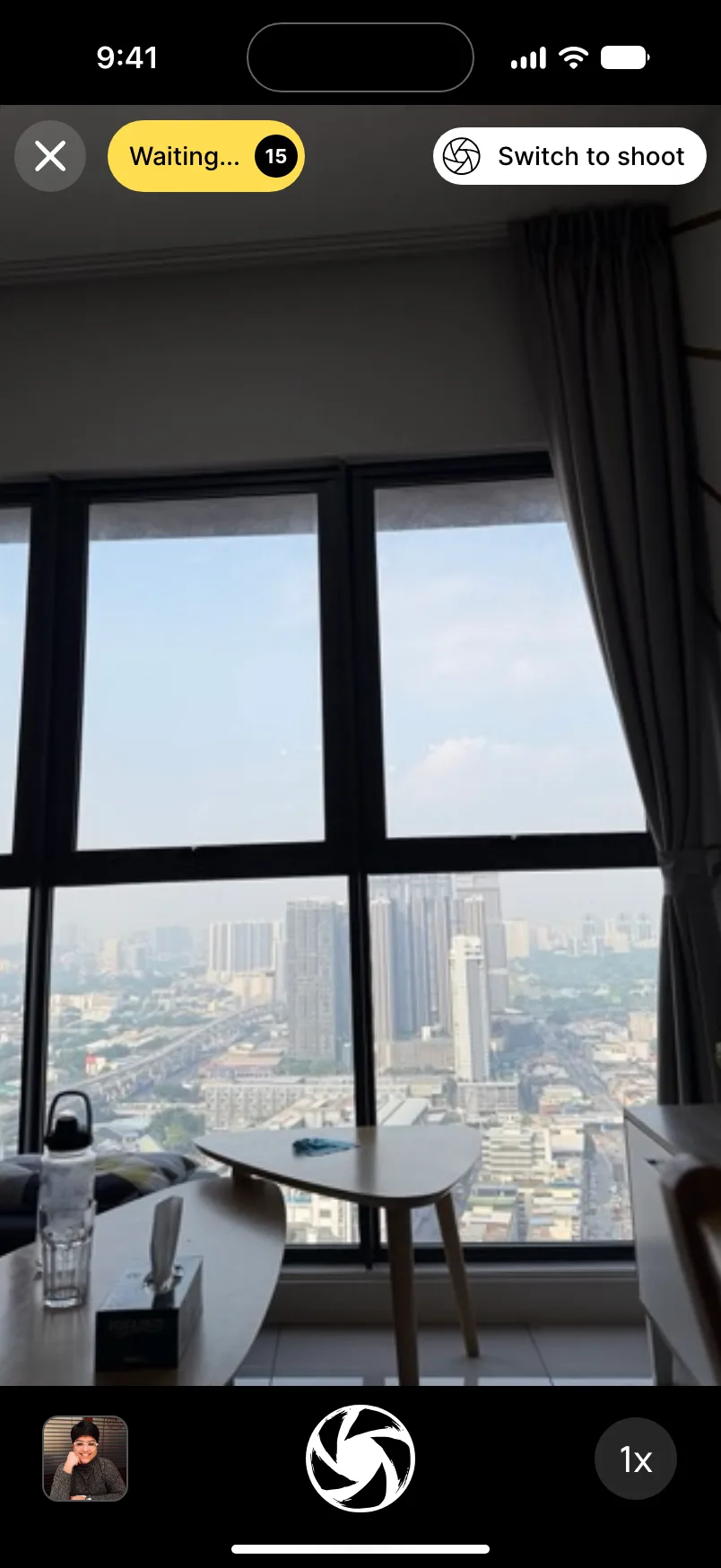
If the link comes back within the countdown, the pair carries on by itself. After 15 seconds of silence the pair ends, both phones go to Home, and Home shows "Disconnected". A remembered pair re-forms by itself when both phones are back. A video that was recording keeps recording through the drop; only a person stops it.
One cause is easy to trigger by accident: leaving the app. When iOS sends Futari to the background on either phone, the pair ends on both phones straight away, without waiting out the 15 seconds. Futari turns off auto-lock while it's open, so an idle phone on a tripod doesn't lock itself.
If the signal pill turns yellow without "Waiting…", the phones are connected but the live picture isn't arriving. A red pill means the connection failed.
Why can't the Shoot phone take the picture?
The Shoot phone can't capture when camera access is off or when iOS has taken the camera away, and both phones show why. On the Shoot phone, a camera that iOS has never asked about shows "Futari still needs the camera" with an Allow camera button. A camera that was denied shows "Camera access is off" and "Allow camera access in Settings to use Shoot. Your preview will appear here once access is restored.", with Open Settings.
When the camera is allowed but still unavailable, a warning line under the top bar shows one of these. The See phone shows the Shoot phone's warning too, so the person holding the remote knows why the shutter isn't firing.
| Message | Fix |
|---|---|
| "Camera capture is still preparing. Keep Futari Kamera open, then try again." | Wait, keep the app open |
| "The camera is unavailable. Close any other app using the camera, then try again." | Close the other camera app |
| "Camera capture is paused while the camera starts. Wait a moment, then try again." | Wait a moment |
| "Camera capture is paused by iOS. Finish the call or dismiss the interruption, then try again." | End the call or dismiss the alert |
| "Camera capture stopped unexpectedly. Reopen Futari Kamera and try again if it does not resume." | Reopen the app |
The warning line holds one line of text, so a long message can be cut short on a small screen. It shows one warning at a time, in this order: camera, storage, heat, then Photos. Low storage, at 512 MB free or less, blocks new recordings; photos still work.
Why wasn't my shot saved to Photos?
A shot isn't saved when Photos access is off for Futari on that iPhone. The viewfinder then shows "Photos aren't being saved — allow Photos access", with a Settings button. If Photos refused the save for another reason, the line reads "Photos aren't being saved —" followed by the reason Photos gave. The warning stays until a shot saves. Saved shots go into an album called Futari on each phone, so look there before assuming a shot is lost.
A video with no sound is a different problem. If the microphone isn't allowed, Futari still records the video, silently. Allow the microphone for Futari in Settings to get sound back.
Is it my Apple Watch Camera Remote instead?
If the remote you mean is the Camera Remote app on Apple Watch, Apple's own rules apply, and Futari isn't involved. Apple says the watch needs to be within normal Bluetooth range of the iPhone, about 33 feet or 10 meters. The watch also offers Camera Remote through a hint on the watch face when you open the Camera on the iPhone. And a shot taken from the watch waits 3 seconds by default, which can look like a shutter that isn't responding; you can turn the timer off in the app's settings.
What can't Futari fix from inside the app?
Some limits aren't errors. Futari runs only on iPhones with iOS 26, so an iPad, an Android phone or an iPhone on an older iOS can't be one of the pair. Futari has no timer or flash control to fall back on when the link is poor, and the Shoot phone always uses the back camera. And the app publishes no range figure, so "nearby, same Wi-Fi" is the only distance guidance we can give.
If none of this helps, the app suggests noting the step that failed and your iOS version before you ask for help.
Frequently asked questions
Why can't my two iPhones find each other in Futari?
Both iPhones need Futari open, both need to be on the same Wi-Fi network, and both need Local Network access allowed. If Local Network was denied, iOS won't ask again, so turn it on in Settings > Privacy & Security > Local Network.
What does Waiting… mean in Futari?
Waiting… means the two phones are still paired but haven't heard from each other for 5 seconds. The pill counts down; if the link is not back within 15 seconds of silence, the pair ends and both phones go back to Home, where a remembered pair reconnects by itself.
Why does Futari say Couldn't connect?
Couldn't connect appears on the first connection to a phone when the other person declined, or didn't tap Accept in time. Tap Try again and ask them to accept, or tap Choose another device.
Why is Futari not saving my photos?
If the viewfinder shows 'Photos aren't being saved — allow Photos access', Photos access is off for Futari on that iPhone. Tap Settings on the warning line, allow Photos, and the next shot saves to the Futari album.
Why did tapping the other phone open a paywall?
Connecting needs a subscription on at least one of the two phones, and that one subscription covers both phones for the session. If neither phone has one, tapping a found phone opens the paywall instead of connecting.