To allow Local Network access on iPhone, open Settings, tap Privacy & Security, tap Local Network, and turn the switch on for the app. For Futari, the app is listed as Futari Kamera, and it needs this switch on for both iPhones, because Local Network access is how the two phones find each other on the Wi-Fi they share.
How do I turn Local Network back on for Futari?
Turn it on in iOS Settings, because iOS shows an app's Local Network prompt only once. Apple's support page on local network access gives the path:
- Open Settings.
- Tap Privacy & Security.
- Tap Local Network.
- Turn on Futari Kamera.
- Switch back to Futari. When the app comes back on screen it starts looking for the other phone again.
Do the same on the second iPhone if it also said no. Both phones have to be on the same Wi-Fi as well; Futari's own setup help says "Join the same Wi-Fi" and "Both phones have to be on one network". The Futari FAQ walks through connecting the two phones.
If Futari notices that Local Network is off, the Home screen shows a card titled "Futari can't find your Duo" that reads: "Local Network is off for Futari, and iOS only asks once. Turn it on in Settings so the two phones can find each other." Its Open Settings button takes you to iOS Settings. Not now hides the card until Futari is next launched.
Why does Futari need Local Network access?
Futari needs it to find the other iPhone. The two phones pair directly over the Wi-Fi network they share, and iOS counts that as talking to devices on your local network. Apple's page explains that since iOS 14, any app that wants to interact with devices on your network has to ask the first time it tries to browse it.
Futari has no direct way to read this setting, so it works it out from discovery. If the search for the other phone reports that iOS refused it, Futari treats Local Network as off and shows the card above. If the search finds any phone at all, Futari treats it as on.
When does Futari ask for each permission?
Futari asks for each permission on the screen that needs it, never during onboarding. The two onboarding pages ask for nothing.
| Moment | Permission | What you see first |
|---|---|---|
| Home appears and starts looking for the other phone | Local Network | The iOS prompt |
| You pick the Shoot role | Camera, then Photos | Futari's card "Let Futari use the camera", then "Save shots to your photos", each before the iOS prompt |
| The Shoot phone switches to video for the first time | Microphone | Futari's card "Record sound too?" |
| A shot is first saved on the See phone | Photos | The iOS prompt |
The See phone has no camera gate of its own, because it only shows the other phone's picture. It asks for Photos when it saves its first shot, since every shot is saved on both phones.
If the camera is denied, Futari stops there and does not ask for Photos on that phone, because a phone that cannot shoot has nothing to save.
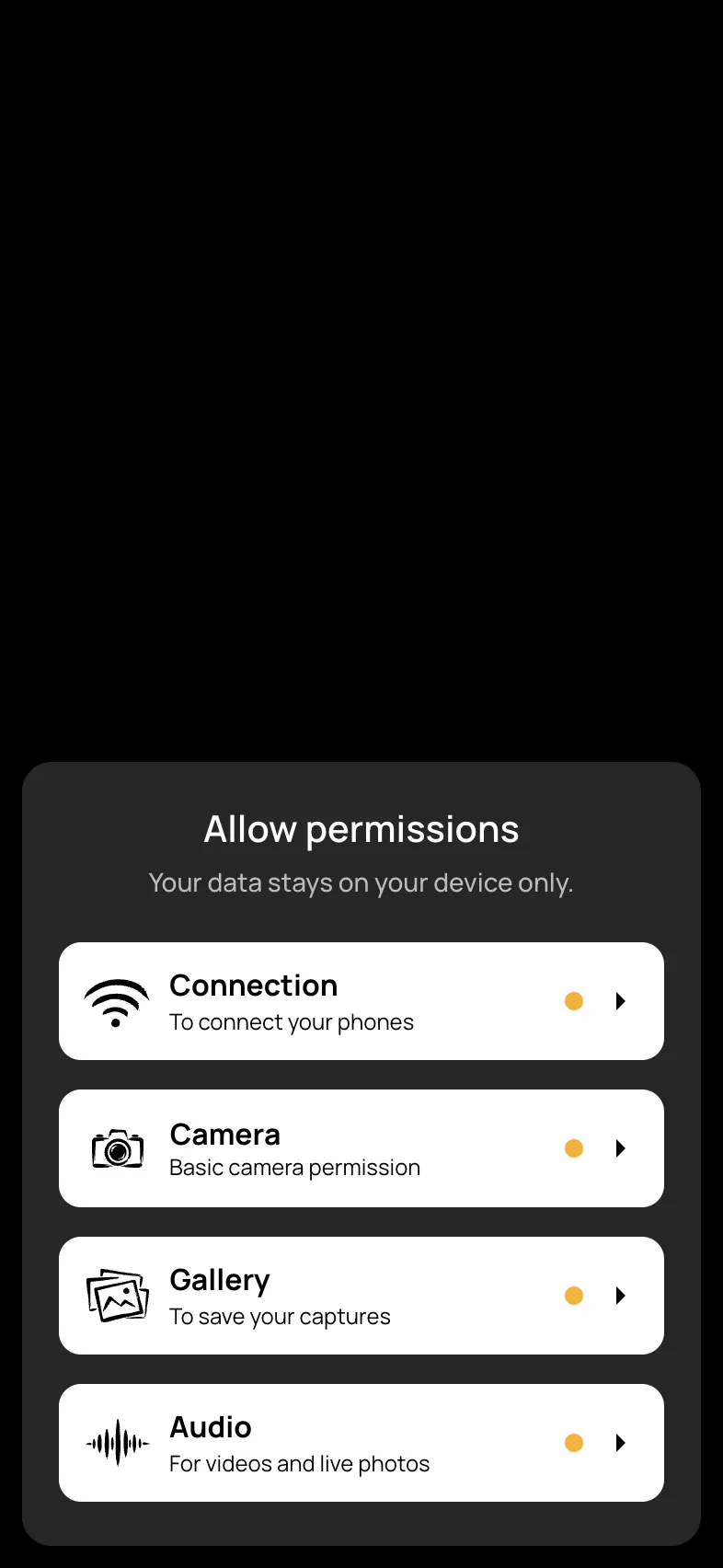
The round status dial at the top of Home opens the sheet above at any time. The dial has one quadrant per permission, lit by whether that permission is allowed. The four rows are Connection (Local Network), Camera, Gallery (Photos) and Audio (microphone).
What do Futari's permission prompts say?
These are the six permission entries in Futari's Info.plist, quoted exactly. Apple requires an app to explain why it wants each permission, and the text in quotes is Futari's explanation for each one.
| Info.plist key | What it covers | Text |
|---|---|---|
| NSLocalNetworkUsageDescription | Local Network | "Connects your two iPhones directly to each other. Nothing leaves the room — no internet is used." |
| NSBonjourServices | The service name Futari looks for on the network | _duocam._tcp (not shown to you) |
| NSCameraUsageDescription | Camera | "Shows this phone's camera to your paired iPhone so you can frame the shot together." |
| NSMicrophoneUsageDescription | Microphone | "Records sound with your videos. Photos and the live view work without it." |
| NSPhotoLibraryAddUsageDescription | Photos, add-only access | "Saves the photos and videos you capture to this iPhone's photo library. Nothing is uploaded." |
| NSPhotoLibraryUsageDescription | Photos, full library access | "Saves your shots to a Futari album in this iPhone's photo library and shows them back to you in the app. Nothing is uploaded." |
Apple defines the add-only key for apps that only add photos and the other key for apps that also read them. Futari asks iOS for read and write access, because it reads its Futari album back to show your shots in the app. The full-library text is the one that goes with that request.
The Local Network text is right about the pairing, since photos, video and the live view go from one phone to the other and not through a server. The app as a whole does use the internet, though. It sends anonymous usage events to PostHog, such as when a pairing, a shot or a purchase happens, with no personal data or media in them. Futari's in-app privacy screen says the same.
What still works if I say no?
Most of Futari still works after a no, except with Local Network, which stops the two phones pairing at all.
- Local Network off. The phones cannot find each other, so nothing pairs.
- Camera off. That phone cannot shoot. The Shoot screen shows "Camera access is off" with an Open Settings button. The same phone can still be the See phone.
- Photos off. That phone does not save shots, and its camera or live view screen shows "Photos aren't being saved — allow Photos access" with a way into Settings.
- Microphone off. Video records without sound. Photos and the live view are unaffected.
To change any of them later, go to Settings, then Privacy & Security, and tap Camera, Microphone, Photos or Local Network. Apple's iPhone User Guide covers Camera, Microphone and Local Network and Photos. Each list shows the apps that asked, with a switch for each.
Why doesn't Futari ask for everything up front?
Futari asks late on purpose, so each prompt arrives on the screen that explains it. Asking for the camera on the See phone would be a request for something that phone never uses, and asking for Local Network over the splash screen would put a network prompt in front of someone who has not seen what the app does yet.
The cost is that you meet prompts in the middle of setting up a shot rather than all at once. Local Network is where that bites, because iOS asks once and a Don't Allow tapped in a hurry means a trip to Settings. If your two phones can't find each other and both are on the same Wi-Fi, check that switch first.
Pairing needs a subscription on at least one of the two phones, and it covers both phones for that session. See Futari pricing.
Frequently asked questions
Why does Futari need Local Network access on my iPhone?
Futari finds and connects to your other iPhone over the Wi-Fi both phones are on. iOS treats that as local network access, so without it Futari cannot see the other phone and the two cannot pair.
I tapped Don't Allow on the Local Network prompt. How do I fix it?
Open Settings, tap Privacy & Security, tap Local Network, and turn on Futari Kamera. iOS does not show the prompt a second time. When you switch back to Futari it starts looking for the other phone again.
Do both iPhones need Local Network turned on?
Yes. Each phone runs Futari and each one looks for the other, so each phone asks for Local Network access on its own Home screen, and each one needs it allowed.
What happens if I don't allow the microphone in Futari?
Futari still records video, without sound. Photos and the live view on the other phone work without the microphone.
Does Futari ask for all its permissions when I first open it?
No. The two onboarding pages ask for nothing. Local Network comes up on the Home screen, Camera and Photos when you pick the Shoot role, and the microphone the first time you switch to video.