
Installing a prebuilt Managed Agent happens in your Claude workspace, not on the catalog site. Anthropic's baseline is file-based: install and authenticate ant, define resources in files, preview the plan, approve it, and keep the generated lockfile with the project. The package workflow adds an inspection stop before that apply step.
That stop is worth keeping. A package can contain an agent, environment, skill, memory store and deployment, and a deployment is a scheduled creator of sessions rather than an interactive chat. Read the package record first, then apply only what you intend to run. Managed Agents gives you the listing, artifact checks and install instructions. Your workspace owns the credentials and the side effects.
What do I need before I install a Managed Agent package?
You need a Claude Console account, an API key, the ant CLI, and a package folder whose resources and access you have read. Anthropic's quickstart shows the CLI installation options and checks the binary with ant --version; the ant apply reference says the command requires CLI version 1.30.0 or later.
The official quickstart starts with the platform's own path. Install ant, authenticate it against the organization and workspace you intend to use, and learn the resource model before you add somebody else's files. Anthropic defines an agent as the model, system prompt, tools, MCP servers and skills. An environment defines the sandbox. A session runs the agent in that environment and emits events as it works.
For a downloaded package, add four checks before you type a command:
- Read the README and resource tree. Find the agent instructions, environment settings, skills, memory stores, vault metadata and any deployment file.
- Read the access boundary. Check network, MCP, shell, package-manager and permission statements. Installation does not grant authentication to a third-party service.
- Read the evidence. A package may have static checks, a dry-run record, an authenticated apply, a representative task, or memory and schedule checks. Those are different claims.
- Confirm the package identity. Managed Agents exposes version, licence, publisher, artifact URL and SHA-256 fields when they are recorded. The download route serves an archive only after its identity and safety checks pass.
The catalog does not ask for your API key. Its package boundary says users inspect and apply packages in their own workspace, and its crawl contract describes the site as a catalog rather than a runner. That separation is part of the install procedure, not a footnote.
How does ant apply install an agent from a package folder?
ant apply reads the native resource files in the package, shows a plan, and creates or updates those resources after you approve it. Anthropic's reference supports agents, environments, skills, memory stores, deployments and vaults, with resources referring to one another by relative path.
A native package has a shape like this:
package/
  agents/<agent>.md
  environments/cloud.yaml
  skills/<skill>/SKILL.md
  memory_stores/history.yaml
  deployments/weekly.md
  vaults/provider.yaml
  README.md
The exact folders depend on the package. A skill is applied as its directory, not as a prompt pasted into a session. A vault file describes vault metadata; it does not contain a personal token. A deployment file contains a schedule and an initial message, which is why you should inspect it before applying the whole directory.
Anthropic's own first-agent example applies one file, such as ant apply agents/summarizer.md. Applying a project directory with ant apply . walks the package and resolves its resource paths in dependency order. The first apply writes claude-lock.json, which records the IDs and hashes of the resources so later applies update the same resources instead of creating duplicates. Treat that lockfile as your workspace state. Do not ship a publisher's personal lockfile to another user.
The catalog's install card makes the same distinction visible. It offers a run-once command when the package has required resources that are not deployments, and it shows ant apply . separately when a deployment is present. That split keeps an interactive trial from silently enabling a recurring deployment.
How do I preview a package before it creates resources?
Run the dry run in the downloaded package directory, inspect the text of the plan, and apply only after the plan matches your intent. The command is:
cd /path/to/downloaded-package
ant apply --dry-run .
Follow this sequence:
- Open the listing. Read the package outcome, requirements, resources, memory policy, schedule, permissions, publisher, licence, version and testing record.
- Download only when the artifact is identified. The catalog's download path requires a licence, package version, a valid SHA-256 identity and either a stored package or a safe artifact URL.
- Inspect locally. Read the README and every native resource. Look for a deployment, external MCP connection, broad network policy or unexpected write access.
- Preview. Run
ant apply --dry-run .. Anthropic says this prints the detailed plan and exits without changing anything. The repository's validation gate adds a specific stop: inspect the output forThis plan cannot be applied, because a zero exit code by itself is insufficient. - Choose the smallest apply. If the package includes a deployment and you want a one-off test, use the listing's run-once command or apply the agent, environment, skill and memory store explicitly. Leave the deployment out.
- Apply intentionally. Run
ant apply .only when you understand each create or update in the plan. Then keep the lockfile and record the CLI version, package hash and test inputs.
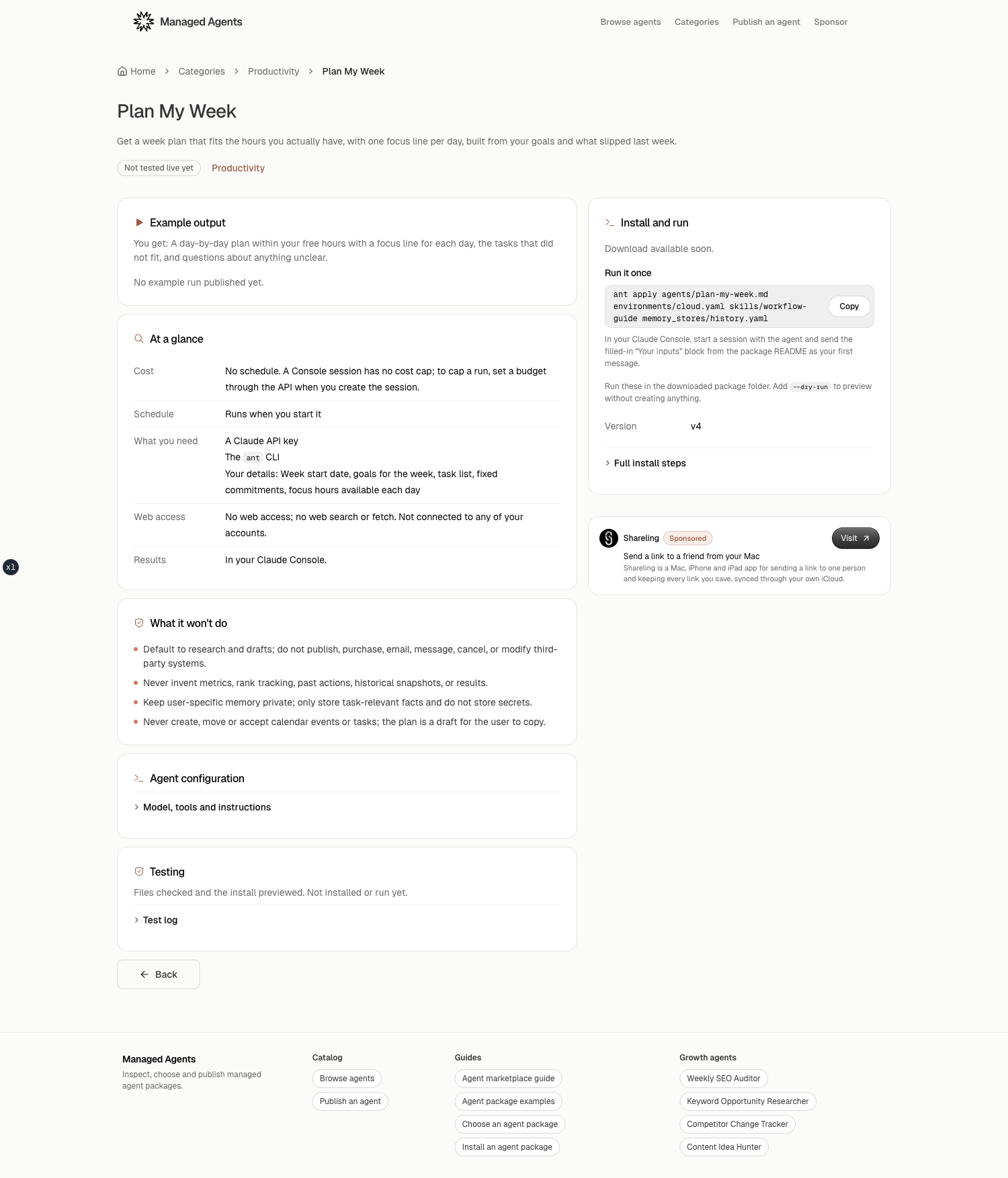
Plan My Week shows the one-off shape in the catalog. Its install card gives this command:
ant apply agents/plan-my-week.md environments/cloud.yaml memory_stores/history.yaml skills/workflow-guide
That package has no deployment. After applying those resources, create a session in Claude Console, attach its memory store with read_write access if you want week-to-week carryover, and send the package's filled-in inputs block. The package still cannot read a calendar or task manager for you; you paste the commitments and tasks it needs.
What changes when a package includes memory or a schedule?
Memory changes how sessions share state, while a schedule changes when new sessions start and can add recurring usage cost. Treat both as explicit resources in the plan.
Anthropic's scheduled deployment documentation says a deployment starts sessions autonomously from a cron expression and timezone. It requires an agent and environment, can attach memory stores, files, GitHub or vault resources, and needs an initial event for each session. Actual execution can jitter by up to 15 percent of the interval between runs, with a minimum of 5 seconds and a maximum of 9 minutes. A deployment budget is copied to each session, so its cap applies per run rather than as one cumulative ceiling.
The catalog puts the operational warning next to the command. If a listing has a deployment, ant apply . turns on its schedule and each run is billed to your account. Use the run-once command first when you want a controlled interactive session. Pausing or deleting a deployment is your workspace operation; downloading a package does not schedule anything.
Memory has its own limit. Anthropic's memory guide says a store persists text documents across sessions, but you attach it in the session creation request. You can attach at most eight stores to one session. Access defaults to read_write; choose read_only for shared reference material or untrusted input that should not be allowed to write trusted memory. A running session cannot add or remove a memory store later.
The package contract makes this concrete for ant apply: creating memory_stores/history.yaml does not mount it into a manually created session. A deployment can reference the store in its resources list, while an interactive session needs its own attachment. Verify the mount before you claim that memory worked. A static resource path proves only that the file exists.
The verification boundary matters here. The repository distinguishes syntax and reference checks, a CLI dry run, a successful live deployment, a representative functional task, and memory or schedule checks. Its 2026-10-18 audit reported static package checks but no authenticated apply or functional evidence for the audited set. "Converted" or "not tested live yet" is useful information. It is not the same as "functional" or "verified."
Before you press apply, ask one final question: what will happen after this command finishes? If the answer is "one interactive session after I attach the resources," the explicit run-once path is probably right. If the answer is "new sessions on a cron schedule, with memory and billed usage," read the deployment file and budget again.
Managed Agents is the next step for this workflow. Open a catalog item, read its install card and evidence, download the identified artifact, and run the dry run in your workspace. The catalog saves the package-discovery and review pass; ant apply remains your deliberate, authenticated action.
Frequently asked questions
Does Managed Agents install a package for me?
No. Managed Agents is a catalog. You download and inspect the package, authenticate `ant`, and run the apply command in your own Claude workspace. The site does not receive your Anthropic credentials or run `ant apply`.
What does ant apply --dry-run do?
It prints the resource plan and exits without creating resources. Inspect the plan for `This plan cannot be applied`; a zero exit code alone is not enough evidence.
Will ant apply . turn on a package's schedule?
If the package contains a deployment resource, `ant apply .` installs it and turns on its schedule. Each scheduled run creates a session and is billed to your account, so use the package's run-once command when you want an interactive trial.
How do I install a package with memory?
Apply the memory-store resource, then attach that store when you create the session. Installing a memory store does not mount it in a manually created session, and a running session cannot add or remove one later.
Find an agent for the work you need doneBrowse the catalog and see what each package can access before you install it in your Claude workspace.
Browse the catalog