
Choosing a Managed Agent package is a fit-and-evidence decision, not a hunt for a generic "best" agent. Anthropic's own documentation gives you the platform baseline: an agent defines the model and tools, an environment defines where it runs, and a session performs a task. A package adds the review work that happens before those resources reach your workspace.
The useful question is simple: can this package do the job I need, with access I understand, and evidence I can trust? Managed Agents makes that question concrete by putting the outcome, required resources, schedule, memory policy, permissions, provenance and verification record beside the install path. The catalog helps you decide. You still apply and run the package in your own Claude workspace.
What should I check before I choose a Managed Agent package?
Check the package's outcome, required inputs, resources and evidence before you compare names or categories. Anthropic describes an agent as the model, system prompt, tools, MCP servers and skills; an environment is the cloud or self-hosted sandbox; and a session is the running instance that performs a task. Those concepts tell you what the package will become after installation.
Start with the baseline workflow in Anthropic's documentation. You define resources as files, run ant apply, approve the plan, and keep the resulting claude-lock.json with the project. That is the right path when you are building an agent yourself. A package selection adds a prior step because someone else has already chosen the resources and instructions.
Use this order when reading a listing:
- Outcome. Name the result you need in one sentence. Prefer "a day-by-day plan within my free hours" over "a productivity agent."
- Inputs. Check that the package lists the information you can actually provide. Missing inputs are a hard stop, not a detail to fill with a guess.
- Native resources. Read every
agents/,environments/,skills/,memory_stores/,deployments/andvaults/path. A package may need only some of them. - Access. Read the network policy, MCP connections, CLI packages and permissions. An empty list means the catalog saw no requirement. It does not prove that the runtime worked without that capability.
- Evidence. Read the verification level, date, test context and limitations. Static checks are useful, but they are not a live run.
The catalog contract also asks for provenance, package version, artifact URL and SHA-256 identity. If those fields are unresolved, you have less information to use when deciding whether to download. That is a reason to pause, not a reason to infer that the package is safe or deployable.
| Listing field | The decision it supports | Stop when |
|---|---|---|
| Outcome, jobs and audience | Does this match the work and the person doing it? | The promised result is vague or unrelated to your job. |
| Inputs and expected outputs | Can you supply the context, and will the result be useful? | The package needs data you cannot provide or returns a different artifact. |
| Native resources | What will ant apply create or update? | A resource is missing, unexplained or outside the package boundary. |
| Network, MCP and permissions | What can the agent reach or change? | Access is wider than the task requires. |
| Memory and cadence | Does state persist, and will work recur? | You cannot explain when memory is attached or when a run starts. |
| Provenance, artifact and verification | Can you identify the bytes and the evidence? | The source, hash or test scope is unknown and the risk matters. |
How do I match a package to the work I need done?
Match the package to the job and its inputs first, then use cadence and expected outputs to narrow the choice. Categories and tags are discovery aids. They are not a quality score, and a package that appears near the top of a list has not thereby been proven better.
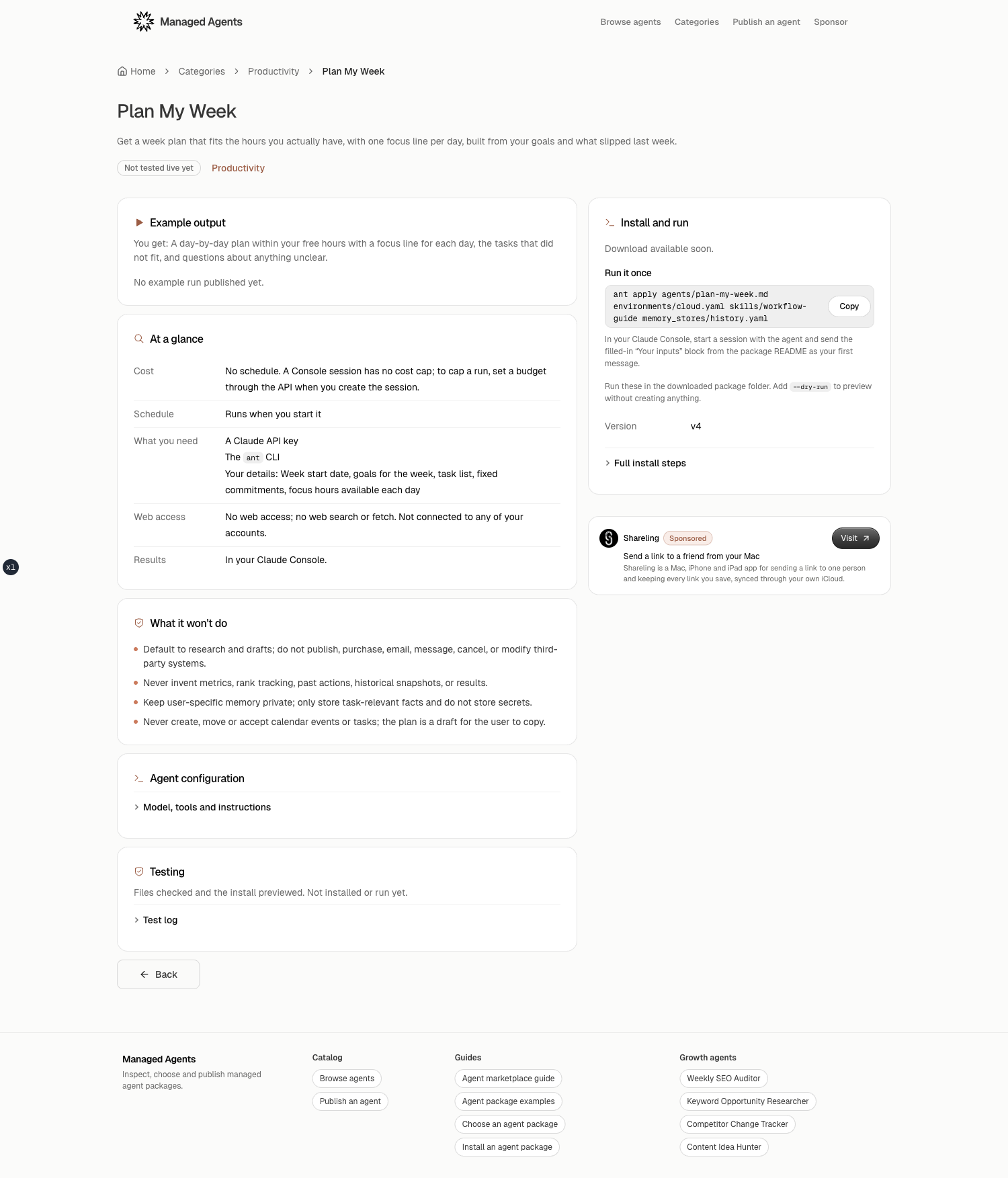
Take Plan My Week as a concrete example. Its listing says it needs a week start date, goals, a task list, fixed commitments and focus hours for each day. It returns a day-by-day plan within those hours, a focus line for each day, tasks that did not fit and questions about unclear inputs. That description lets you decide whether the package fits before you read its agent instructions.
The same record says the package is on demand, works from your inputs and memory, has no outbound network, no shell and no web search or fetch, and does not connect to your accounts. That narrow scope is a feature for planning from pasted context. It would be the wrong choice if your job requires reading a live calendar or searching the web.
When two packages appear to solve the same job, write down the difference in their inputs and access. A research package that needs public web access is a different operational choice from a planning package that reads only pasted inputs and an attached memory store. A package with an optional deployment also asks you to decide whether recurring runs belong in the first install.
Read the example output when it exists, but do not mistake a sample for a guarantee. The catalog contract keeps example_report, cost notes and unknown values explicit. A missing sample tells you to ask for more evidence or run a controlled test. It does not justify inventing what the package will return.
How do schedule, memory, network and permissions change the choice?
Schedule, memory, network and permissions change the risk of a package even when the headline outcome is the same. Review each one as a separate decision rather than treating "Managed Agent" as a single capability.
Anthropic's scheduled deployment is a resource that starts sessions on a cron expression and timezone. It is not an interactive chat. The API documentation says scheduled execution can jitter by up to 15 percent of the interval between runs, with a minimum of 5 seconds and a maximum of 9 minutes. A deployment budget applies to each session it starts, so it limits each run rather than acting as one cumulative ceiling. Those details matter if a package includes deployments/ and you expect a precise time or a single bill.
Memory has a different boundary. Anthropic says a memory store carries text documents across sessions, but you attach it when creating a session. The current memory guide supports up to eight stores per session, with read_write as the default access and read_only when the agent should not modify reference material. The guide also warns that untrusted input can write malicious content into a writable store, so read-only access is the safer choice for shared reference data.
The package contract states the product version of that rule plainly: creating a memory store does not mount it in a manually created interactive session. A deployment can reference the store in its resources list, while a manually started session needs its own attachment. If a listing says "memory available," ask which session receives it and with what access.
Plan My Week makes the distinction visible. Its memory store is defined but not attached by a deployment because the package has no schedule. Its install instructions tell you to create a Console session and attach the store with read_write if you want it to compare this run with the last one. Without that attachment, each run starts without the package's historical notes.
Finally, check network and permissions against the task. "No outbound network" is a real limit. So is "no shell," "no web search or fetch," or "not connected to any of your accounts." A package that cannot read your calendar cannot promise calendar-aware planning. A package with no MCP connection cannot silently access one. The detail page's configuration and "What it won't do" sections are there to make these boundaries visible before installation.
What does a verification level actually prove?
A verification level describes the evidence recorded for a package, not a promise that it will work in every workspace. The catalog uses imported, converted, deployable, functional and verified as distinct levels.
The difference is practical. imported means the files were copied from a source and not checked yet. converted means the files were checked and the install was previewed, but the package was not installed or run. deployable means an authenticated apply succeeded in a disposable test workspace and the expected resources existed, but no representative task ran. functional means one real task ran with user-provided inputs. verified adds the memory and schedule checks when those resources exist.
The repository's validation contract requires a dry run to inspect the text This plan cannot be applied; exit code zero alone is insufficient. It then keeps live deployment, a functional task, and memory or schedule checks separate. The 2026-10-18 package audit is equally explicit: it checked package shape, syntax, references and credential patterns, but did not import, execute, apply, schedule or install the audited packages. It recorded zero packages with authenticated apply or functional evidence at that point.
That boundary gives you a useful selection rule. Choose a converted package for a low-risk inspection or a controlled experiment only when you accept that it has no runtime proof. Prefer deployable, functional or verified evidence when the package will touch important data or run repeatedly. Read the date, CLI and workspace context, because a label without its evidence is too thin to compare.
Use the listing as a short review record before you download:
- Write the outcome and inputs you need, then compare them with the listing.
- Mark each required resource and note whether it is interactive, persistent or scheduled.
- Record network, MCP, memory and permission limits in plain language.
- Check provenance, package version, artifact identity and verification evidence.
- Open the install card, read the dry-run command, and stop when a field does not answer the risk you care about.
Managed Agents is the next step when you want this record beside real packages. Open the catalog, search for the outcome, and compare the listing fields before you download. That saves the manual pass through a package folder while keeping the apply decision in your own workspace.
Frequently asked questions
What is the first thing to check in a Managed Agent package?
Check the one-line outcome and expected inputs first. A package is a fit only when its stated work matches the result you need and you can provide the inputs it expects.
Does a memory store mean the package remembers my previous sessions?
No. A memory store must be attached to the session when you create it. Creating or installing the store alone does not mount it in a manually created interactive session.
Does a converted or dry-run package count as tested?
No. Converted files and a successful dry run show that files can be checked or previewed. They do not prove that an authenticated apply succeeded, that a task ran, or that memory and schedule behavior worked.
How should I compare two packages with the same outcome?
Compare the required resources, inputs, network and MCP access, memory policy, permissions, cadence, expected outputs, provenance, artifact hash and verification evidence. Choose the package with the narrower access and clearer evidence that still fits your work.
Find an agent for the work you need doneBrowse the catalog and see what each package can access before you install it in your Claude workspace.
Browse the catalog